Payroll Migration Checklist: Steps for a Smooth Switch
Switching payroll providers involves a lot of moving pieces. Employee records need to transfer. Year-to-date totals need to match. Tax accounts, deductions and PTO balances all need attention.
The easiest way to manage the process is to know what you need before implementation begins.
This payroll migration checklist walks you through each stage. Use it to prepare your data, work with your new payroll partner and check the details before your first live payroll.
Want a copy to keep on hand? Download the Payroll Migration Checklist PDF and check off each step as you go.
Before You Switch Payroll Providers
A successful payroll migration starts before any data moves.
First, decide when you want your new payroll system to go live. Then work backward with your new payroll partner to understand what needs to happen before that date.
Your Pre-Migration Checklist
At PayFWDs, the kickoff call is an important part of implementation. It establishes a connection between our team and the client. We also use it to understand the company's setup, payroll needs, taxes and other details before moving forward.
If you are still deciding when to make the move, read How to Switch Payroll Providers Mid-Year first.
Gather Your Employee and Payroll Information
Your payroll migration is only as reliable as the information behind it.
According to the PayFWDs implementation team, the most important thing to have ready is a complete, validated payroll data set from your current system.
That means looking beyond your current employee list.
Historical payroll and tax information matters too. This includes records for terminated employees. PayFWDs sees businesses focus on current employees while overlooking historical information needed for implementation.
Employee Information Checklist
Do not assume information is accurate because it came from your existing payroll system. Review it before it becomes the starting point for your new payroll.
Gather Your Payroll Reports and Historical Data
Current employee information tells only part of the story.
Your new payroll partner also needs information about payroll already processed. This becomes especially important when switching providers during the year.
Historical data for payroll and taxes is one of the most commonly forgotten items PayFWDs sees during implementation. That history may also include employees who no longer work for the company.
Payroll Data Checklist
Keep copies of the original reports you use during migration. They will be useful when your team compares the old and new payroll systems.
Prepare for Payroll Implementation
Once your data is gathered, implementation moves into setup and validation.
This is where your payroll partner begins configuring the new system around your actual payroll operation.
The goal is not simply to recreate your old system. It is to make sure the new setup reflects how your company needs to run payroll.
Payroll Implementation Checklist
Verify Your Payroll Tax Setup
Payroll taxes deserve their own checkpoint.
Do not assume every tax account or responsibility automatically transfers when you change payroll providers.
Your new payroll partner needs complete tax information. That may include tax IDs, account information and historical payroll tax data.
Payroll Tax Checklist
The key is knowing who owns each task. Clear responsibilities can prevent a missing account or incomplete record from becoming a problem later.
Before Your First Payroll
This is one of the most important stages of your payroll conversion.
Before employees are paid through the new system, your team should verify the information and calculations behind that payroll.
For PayFWDs, that includes completing a test payroll and reconciliation.
What Is a Test Payroll?
A test payroll compares results from your previous payroll setup with the new system.
The purpose is to identify differences before the first live payroll.
PayFWDs compares key payroll calculations and balances during this process. That gives the implementation team a chance to investigate discrepancies before employees are affected.
First Payroll Checklist
This step should not be treated as a box to check.
It is a reconciliation.
The goal is to understand why payroll results differ and resolve problems before the new system becomes your live payroll.
The One Step PayFWDs Would Never Skip
If there is one item to put at the top of every payroll migration checklist, it is the parallel payroll and reconciliation.
The PayFWDs implementation team uses this step to confirm the new payroll aligns with previously processed payrolls.
That means checking gross pay, taxes and withholdings, deductions, net pay and year-to-date balances.
“A complete test payroll and reconciliation helps ensure payroll is in alignment with previously processed payrolls. It gives us the opportunity to confirm the system is calculating the company correctly before the first live payroll.”
- Rachel Dieruf | Implementation Project Manager
That extra review can catch a small discrepancy before it becomes an employee payroll issue.
PayFWDs also uses guided onboarding and audit checkpoints before the first live pay date. That hands-on implementation model is part of its broader support approach.
After Your First Payroll Goes Live
A successful first payroll does not mean the review is finished.
Take time to confirm what actually happened after payroll processing. Review employee payments, reports and tax information while the details are still fresh.
Post-Go-Live Checklist
Keep your migration records somewhere your payroll team can find them later. Historical reports can remain important long after implementation ends.
Payroll Migration Checklist at a Glance
Before You Switch
Timeline, reports and responsibilities
Gather Information
Employee, payroll and historical data
Implementation
Taxes, schedules, deductions and PTO
Before First Payroll
Test payroll and reconciliation
After Go-Live
Payments, reports and follow-up
Frequently Asked Questions
-
Yes. A payroll provider switch can happen during the year. The important part is accurately transferring and validating year-to-date payroll information.
-
The exact reports depend on your payroll setup. Expect to provide payroll history and year-to-date information for wages, taxes and deductions.
Historical information for terminated employees may also be needed. Your new payroll partner should provide a specific list during implementation.
-
There is no single timeline that applies to every business.
Employee count, payroll complexity, tax setup and data quality can affect implementation. Your payroll partner should establish the timeline before migration begins.
-
Yes. PayFWDs uses a test payroll and reconciliation before the first live payroll.
The process compares important calculations such as gross pay, taxes, deductions, net pay and year-to-date balances. Differences can then be reviewed before employees are affected.
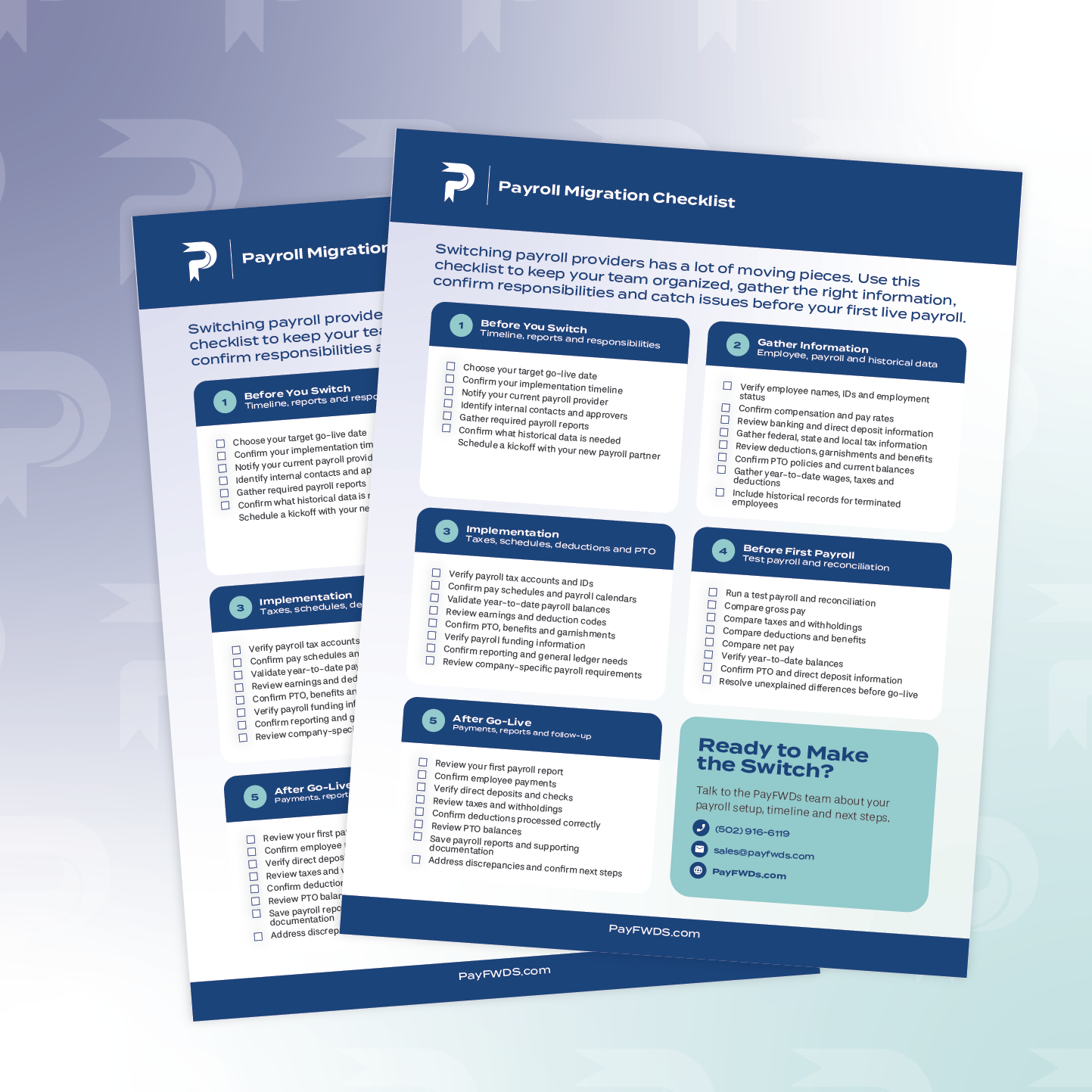
Keep This Payroll Migration Checklist With You
Switching payroll providers does not need to feel like one massive project.
Break the migration into stages. Gather clean information first. Confirm responsibilities during implementation. Then test and reconcile payroll before going live.
Most importantly, do not treat the migration as a simple data transfer. The numbers behind that data need to be reviewed too.
Ready to make the switch? Talk to the PayFWDs team about your payroll needs.